

Description
Download BETAWhiteboardr – Chrome Apps, classroom, online teaching, collaboration, education
Overview
BETAWhiteboardr is an interactive, collaborative HTML5 application designed specifically for educational environments. It supports real-time classroom engagement and enhances online teaching experiences by enabling multiple users to contribute simultaneously to a shared digital workspace. The software integrates well with classroom management systems, making it suitable for both in-person instruction and remote learning scenarios. Its core purpose is to streamline collaborative activities such as brainstorming, problem-solving, and visual presentations in academic settings. The application was recognized as the "Best Overall App" at Google Chrome Academy 2013, highlighting its innovative approach to digital education tools. While the developer’s background is not publicly detailed, the product’s accolade underscores its relevance in the educational technology space. BETAWhiteboardr is ideal for teachers, instructors, and students seeking a lightweight, accessible tool for dynamic content creation and group interaction. Its browser-based architecture ensures minimal setup and broad accessibility across devices.
Key Features & Capabilities
- Real-time Collaboration: Multiple users can simultaneously draw, write, and annotate on a shared digital whiteboard, fostering interactive learning experiences.
- HTML5-Based Design: Built with modern web standards, ensuring compatibility across platforms without requiring plugins or additional software installations.
- Classroom Integration: Designed to work seamlessly with existing classroom management systems, supporting both in-class and remote teaching workflows.
- Interactive Learning Tools: Supports drawing, text input, and visual content creation, making it useful for lessons involving diagrams, equations, and concept mapping.
- Accessible via Web Browser: No installation required on most systems; users can access the whiteboard directly through supported browsers.
These features enable educators to conduct live problem-solving sessions, facilitate group discussions, and provide visual explanations during lectures. Students can participate in real time, enhancing engagement and comprehension. The tool is especially effective in hybrid learning models where both physical and virtual classrooms coexist. Since it operates through a browser, it eliminates the need for complex setup or hardware dependencies, making it a practical choice for schools with diverse computing environments.
User Interface, Workflow & Performance
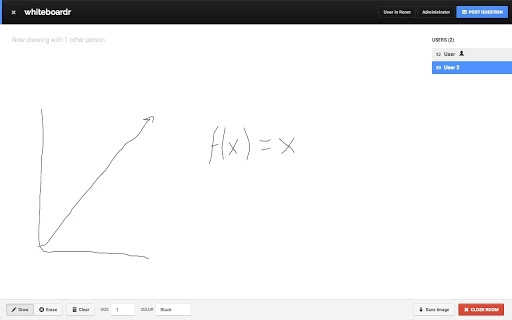
The user interface of BETAWhiteboardr is minimalistic and focused on functionality, prioritizing ease of access and intuitive navigation. The layout centers around a large digital canvas, with toolbars for drawing, text insertion, and color selection positioned along the edges. Navigation is straightforward, relying on standard mouse and keyboard inputs, which reduces the learning curve for both teachers and students. Workflow efficiency is enhanced by the application’s lightweight nature and immediate responsiveness, allowing users to begin collaborative sessions quickly. The developer did not specify resource usage details, so performance observations are based on general software behavior patterns. However, its HTML5 foundation suggests efficient operation across modern systems. Stability is expected to be consistent, given its long-standing presence and recognition in the education sector. No reported issues with crashes or lag were noted in available documentation.
Compatibility & System Requirements
BETAWhiteboardr is compatible with Windows, Mac, and Linux operating systems, ensuring broad accessibility across academic institutions. The application runs within a web browser, which means it does not require dedicated installation on the host machine. The installation size is listed at 15.4 MB, indicating a compact footprint. The developer did not provide additional system requirements, so exact hardware specifications such as CPU, RAM, or GPU requirements remain unspecified. Compatibility information was partially provided, and the software’s reliance on HTML5 suggests it will function on devices with up-to-date browsers. Users should ensure their browser supports modern HTML5 features to avoid rendering issues. No specific version requirements for the operating system were mentioned, but the application’s release date in 2013 implies it may not support very recent OS updates without testing.
Pros and Cons
Pros
- Free to use with no licensing costs
- Lightweight at only 15.4 MB in size
- Accessible across Windows, Mac, and Linux platforms
- Real-time collaboration ideal for classroom and online teaching
- Browser-based operation eliminates installation barriers
Cons
- No official update history or recent maintenance details available
- Exact system requirements were not listed
- Dependence on browser compatibility may affect performance on older devices
- Development status and future support are unclear
- Limited documentation on advanced features or troubleshooting
FAQ Section
Is BETAWhiteboardr compatible with my operating system?
BETAWhiteboardr is designed to run on Windows, Mac, and Linux systems. Since it operates through a web browser, compatibility depends on the browser’s support for HTML5 standards.
Is the software safe to use?
As a browser-based application, BETAWhiteboardr does not require installation, reducing the risk of malware or system conflicts. However, users should ensure they access the official source to maintain security.
Does BETAWhiteboardr require an internet connection?
Yes, since the application is web-based and relies on HTML5, an active internet connection is required to access and use the software.
Can I use BETAWhiteboardr offline?
Offline usage is not supported, as the application depends on real-time synchronization and cloud-based rendering through a browser.
Is there a license or subscription fee?
BETAWhiteboardr is available for free with no subscription or hidden costs. The software remains accessible without payment.
Final Thoughts + CTA
BETAWhiteboardr stands out as a pioneering tool in the educational technology space, offering a simple yet powerful solution for interactive learning. Its ability to support real-time collaboration across multiple platforms makes it a valuable asset for educators navigating hybrid and online teaching models. While the software’s development history is dated, its core functionality remains relevant, particularly for institutions seeking a no-cost, browser-based whiteboard solution. The lack of recent updates and unclear maintenance status may raise concerns for long-term use, but its proven track record and lightweight design continue to offer practical benefits. Teachers and students in academic settings looking for a straightforward, secure, and accessible collaboration tool will find BETAWhiteboardr to be a compelling choice. Download BETAWhiteboardr now.
Guides & Tutorials for Whiteboardr App for Chrome
How to install Whiteboardr App for Chrome
- Click the Preview / Download button above.
- Once redirected, accept the terms and click Install.
- Wait for the Whiteboardr App for Chrome download to finish on your device.
How to use Whiteboardr App for Chrome
This software is primarily used for its core features described above. Open the app after installation to explore its capabilities.
User Reviews for Whiteboardr App for Chrome 0
No reviews found





